A whole home backup battery needs to do more than keep a phone charged. I want to know whether it can keep the house comfortable, protect the food in the fridge and freezer, and handle the appliances we actually use when the grid goes down.
So I connected an EcoFlow Delta Pro Ultra X to my home and ran it through a summer afternoon and into the night. That included air conditioning, refrigeration, pumps, Wi-Fi, and even a load in our gas dryer.
The result: with three batteries totaling about 18 kWh, the system projected roughly 11 hours of backup under the conditions I tested. I stopped before the batteries ran empty, with 21% remaining. That distinction matters. This was a real household test, not a measured run to shutdown.
There is a lot I like about this system, but there are also a couple of design choices I would change. And while emergency backup is the main attraction, time-of-use electricity rates could give it a useful job between outages, too.
Key Takeaways
- The 18 kWh setup projected roughly 11 hours of household backup with air conditioning.
- Raising the cooling setpoint substantially reduced household demand and increased estimated runtime.
- A proper inlet and interlock enabled manual home backup without automatic switching.
- Solar performance, essentials-only runtime, and Smart Home Panel 3 automation were not tested.
Table of Contents
- Delta Pro Ultra X vs. Delta Pro Ultra: What Changes?
- Two Things I Would Change
- How I Connected the Ultra X to My Home
- The First Loads: Air Conditioning, Refrigeration, and Pumps
- The Thermostat Made a Big Difference
- Gas Appliances Change the Backup Equation
- Small Loads Add Up, Too
- What the EcoFlow App Lets You Control
- Can Time-of-Use Savings Help Pay for the System?
- The Nighttime Result: 21% Remaining With the AC Running
- My Take on the Delta Pro Ultra X for Whole Home Backup
Delta Pro Ultra X vs. Delta Pro Ultra: What Changes?
The Delta Pro Ultra X and the original Delta Pro Ultra look similar, but the inverter output is a big step up.
- Delta Pro Ultra X: 12,000-watt inverter, with three batteries in my test configuration for approximately 18,000 watt-hours of storage.
- Delta Pro Ultra: 7,200-watt inverter, with two batteries in my comparison setup for approximately 12,000 watt-hours of storage.
- Each battery: approximately 6,000 watt-hours, or 6 kWh, using rounded figures.
The inverter is the brains of the operation. It is not another battery. The batteries connect together with locking cables, and the display identifies how many batteries the system recognizes. Mine showed three, which matched the physical setup.
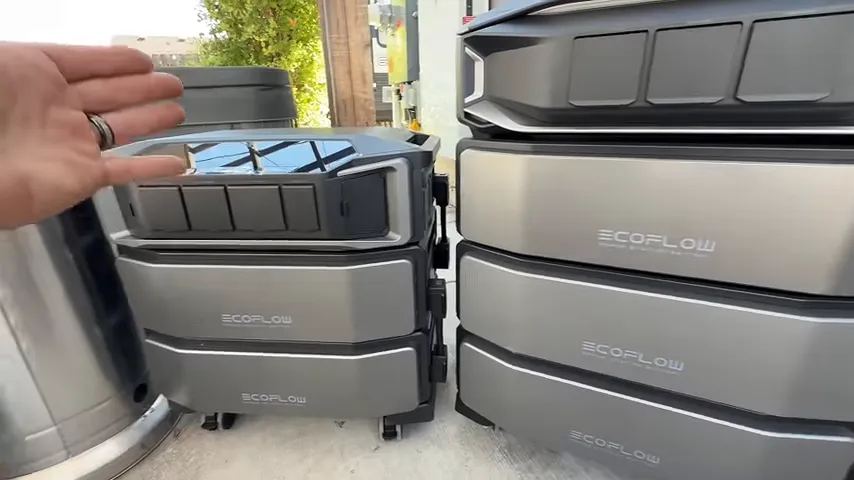
It is important to separate power output from stored energy. The larger inverter determines how much equipment the system can supply at once. Battery capacity determines how long it can keep supplying that equipment. A 12,000-watt inverter does not mean the house constantly draws 12,000 watts.
More emphasis on powering the house
The Ultra X has fewer standard 120-volt outlets than the original Ultra, and it drops the USB and USB-C connections. I understand the thinking here: this is primarily a whole home backup system, rather than a power station built around plugging in small devices directly.
The Ultra X includes 30-amp and 50-amp 120/240-volt outputs. With a suitable home connection, it can supply both ordinary household circuits and compatible 240-volt appliances, within the limits of the entire installation.
The original Ultra has a 30-amp 120/240-volt output, a separate 120-volt 30-amp RV-style outlet, and four standard 120-volt 20-amp outlets.
Movable storage is a genuine advantage
One thing I really appreciate is that the EcoFlow system is movable. It is heavy, but I could roll it across concrete without much trouble.
Compared with my wall-mounted Tesla Powerwall 3, this modular format gives me more flexibility. I can take the battery system to another home or move it to another location during an emergency. A permanently installed battery is not something you simply roll out and relocate.
That does not make the EcoFlow lightweight or the home's electrical connection portable. It does mean the battery investment itself is easier to move.
Two Things I Would Change
The proprietary charging connector
The Ultra X uses a proprietary locking charging connector. The locking mechanism is secure, but if the cable gets lost or damaged, replacing it is not as simple as picking up a common cord.
The original Delta Pro Ultra uses a more conventional charging connection. I prefer that simplicity. The Ultra X connector may serve the system's higher charging capabilities, but needing a model-specific replacement is still a drawback worth knowing about.
The separate solar isolator box
The Ultra X can accept up to 10,000 watts of solar input, which is a lot of potential charging power. The part I do not love is the separate solar isolator box required for that connection.
You do not simply plug the panels straight into the unit. The arrangement shown requires mounting the isolator and completing the appropriate wiring between it and the power system.
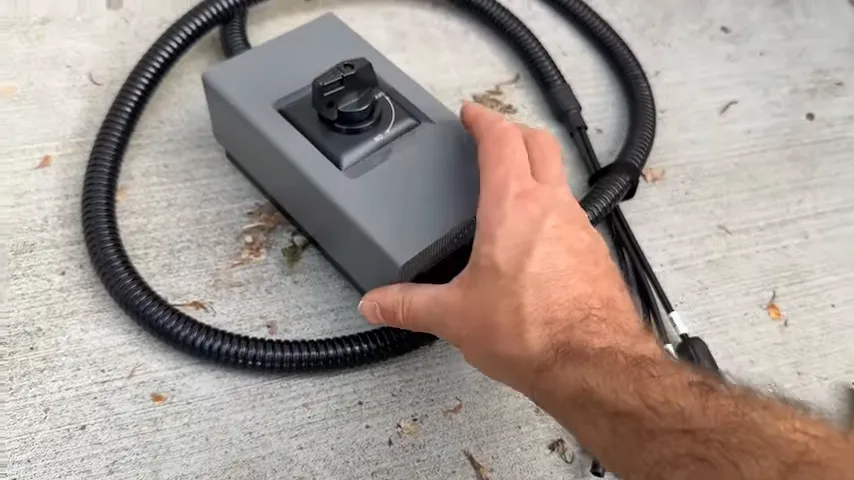
I would like to see that connection made more integrated and straightforward. Someone buying a modular backup system may not want another box to mount and wire.
Solar was not connected during this runtime test. I had panels on the way, but solar charging and sustained off-grid operation were still things I planned to test separately.
How I Connected the Ultra X to My Home
My home uses a manual backup connection, not an automatic transfer setup. The main components are:
- A power inlet box that receives power from the backup system.
- A dedicated 30-amp breaker connected to that inlet.
- A panel interlock that prevents the utility main and backup breaker from being switched on together.
- A matching locking power cord between the EcoFlow output and the inlet.
The interlock is the critical piece. It physically requires the main utility breaker to be off before the backup breaker can be turned on.
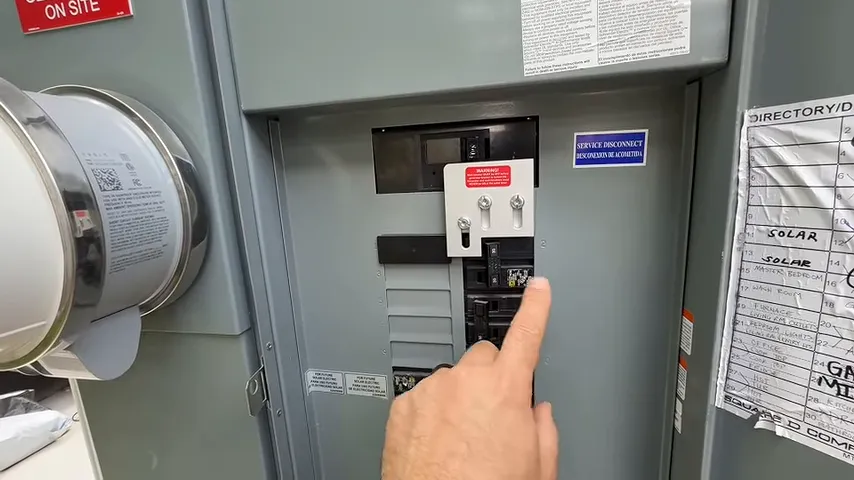
This is not a matter of plugging a battery into a household wall outlet. Have a qualified electrician install and verify a code-compliant inlet and transfer arrangement. Never backfeed a home through an ordinary receptacle. For broader outage planning, Ready.gov's power outage guidance is a useful reference.
For this test, I disconnected utility power, used the installed interlock arrangement, and turned off my existing solar system so it would not affect the results. I then connected the locking cord and enabled the EcoFlow's AC output.
Although the Ultra X has a 50-amp output, my home connection is 30 amps. That connection remains a limit regardless of the inverter's larger rating. I did not need a 50-amp inlet for the loads I intended to run.
Plan for weather protection
My electrical equipment is outside, which makes placement important. I would not treat this unit as weatherproof or leave it exposed to rain or snow.
A protected location and manufacturer-approved operating conditions need to be part of the plan before an outage. Cold and heat can also affect battery performance. Any shelter needs to preserve the clearances and ventilation the equipment requires.
The First Loads: Air Conditioning, Refrigeration, and Pumps
I enabled AC output at about 12:44 p.m., starting with 99% charge. I had not gone around the house switching everything off first. I wanted to see what would come back on.
Initially, output was around 1,400 watts, with an estimated 11 hours and 44 minutes remaining. Then the hot tub jet pump automatically restarted after the power interruption.
The load jumped to about 5,600 watts, and the Ultra X handled it without an issue. That was a useful real-world check, though it was nowhere near a full 12,000-watt output test.
At different points, the connected household loads included:
- The MrCool ceiling cassette mini split providing air conditioning.
- The main refrigerator and garage refrigeration and freezer loads.
- A pool pump and hot tub pumps.
- Wi-Fi equipment.
- The electrical requirements of our tankless water heater.
- A short cycle in the gas dryer.
These appliances did not all draw their maximum power continuously. Compressors and pumps cycle, which is exactly why household battery runtime is a moving target.
After the initial activity settled down, total output was around 1,800 watts. At that point, the display estimated about 8 hours and 44 minutes remaining.
The Thermostat Made a Big Difference
The mini split was initially set to 68°F. It was putting out nice cold air, but that is not how I would manage cooling during an extended emergency.
I raised the setting to 75°F. Once the cooling demand eased, the household load dropped to roughly 1,000 watts, and the estimated remaining runtime moved toward 15 hours.
That is a substantial change without giving up refrigeration, internet, or cooling altogether.
The same principle applies in winter. Maintaining 75°F indoors when it is 30°F outside takes more heating than allowing a lower indoor setting. Depending on the household's needs, a setting around 60°F to 65°F may reduce demand while keeping the home usable.
The point is not to pick one temperature for everybody. It is to choose a safe, reasonable setting rather than asking the HVAC system to maintain normal luxury-level comfort throughout an outage. The Department of Energy explains the same basic relationship in its thermostat guidance.
A brief test with the original Ultra connected
I also briefly connected the original Delta Pro Ultra using the compatible cable supplied with my Ultra X. The estimated runtime increased to about 16 hours and 45 minutes, then settled near 14 hours and 49 minutes after I disconnected it.
At first, that increase seemed smaller than I expected. Then I checked the original Ultra: it was only at about 23% charge.
That explains why the extra system did not add anything close to its full nominal storage. It was an interesting compatibility check, but not a controlled runtime test of two fully charged systems.
Gas Appliances Change the Backup Equation
A gas furnace still needs electricity
A gas furnace needs electricity for its controls, ignition, and blower. If whole home backup is outside the budget, a dedicated furnace transfer switch can be a more focused option.
I have an EZ Generator Switch installed at my furnace. With a properly installed, compatible setup, it allows a suitable generator or power station to supply the furnace while the thermostat continues operating normally.
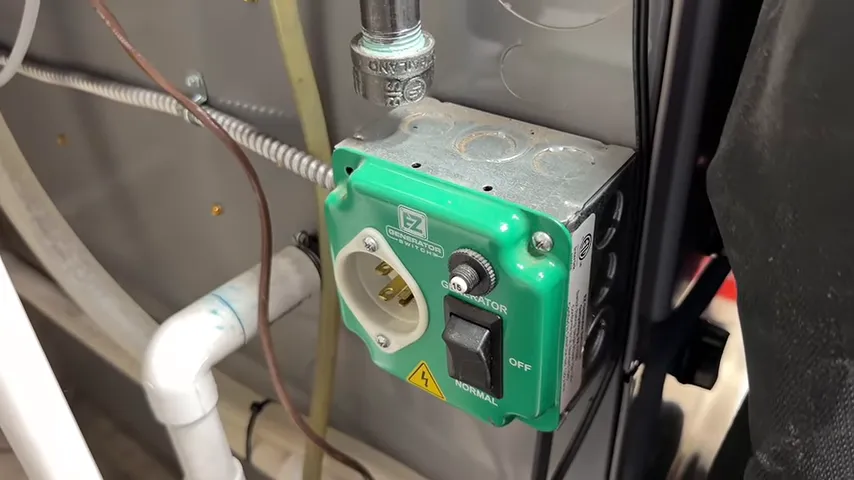
This was an explanation of my furnace backup arrangement, not a measured winter heating runtime test. Fuel availability and electrical compatibility still matter.
Testing the gas dryer
I moved a load of laundry into our gas dryer and started a 20-minute quick-dry cycle. Household output briefly rose to roughly 1,500 watts, then settled around 1,300 watts.
The brief increase appeared consistent with the dryer's ignition activity. Once running, it added a relatively modest electrical load because gas supplied the drying heat.
An electric resistance dryer would be a different situation. A dryer drawing 3,500 watts for half an hour would consume about 1.75 kWh just for that cycle. During an emergency, that is a meaningful amount of stored energy to spend on laundry.
Gas appliances are not energy-free. They simply shift much of the heating demand away from the battery.
Small Loads Add Up, Too
At the early afternoon check, charge was down to 87%. Total household output moved between roughly 1,000 and 1,800 watts as the mini split's outdoor unit cycled.
Those were whole-house readings, not separate measurements of the air conditioner alone.
I then switched off the hot tub circuit. Output dropped by about 200 watts, consistent with the circulation pump's expected draw. Household demand subsequently appeared around 824 watts in the app.
Two hundred watts may not sound like much next to a 12,000-watt inverter. But during a long outage, a continuous load matters. If the hot tub is not needed, shutting it down preserves energy for something more important.
Winter freeze protection could change that decision. That is the useful part of a panel-connected system: I can choose which circuits matter for the situation instead of treating every load as equally essential.
What the EcoFlow App Lets You Control
The app was connected over Wi-Fi through the router that the battery system itself was powering. That let me monitor output, battery status, and estimated runtime without standing beside the unit.
The controls and information I explored included:
- Solar input and AC output readings.
- Remaining charge and runtime estimates.
- Electricity rate entry and time-of-use options.
- Charge and discharge settings.
- AC charging wattage adjustments.
- EV charging and generator-related settings.
- Battery health information.
- Storm Guard settings intended to prepare charging ahead of approaching storms.
For ordinary charging from my 15-amp circuit, I selected a 1,500-watt charging setting. Charging power needs to match the supply circuit and the manufacturer's requirements, rather than simply being set as high as possible.
I found the interface easy to use. Remote monitoring is handy, although keeping the router powered does not guarantee the internet provider's service will remain available during an outage.
Can Time-of-Use Savings Help Pay for the System?
A battery does not have to sit idle waiting for a storm. If your utility charges more during certain hours, you can charge during cheaper periods and use stored energy during the expensive window.
On the Utah plan I described, the weekday peak window was 6 p.m. to 9 p.m. I quoted approximate rates around 30 cents per kWh during that window, compared with about 5 to 6 cents at other times.
The basic strategy is straightforward:
- Charge the battery during lower-cost hours.
- Supply household loads from the battery during the peak-price window.
- Return to the normal supply arrangement afterward while preserving the backup reserve you need.
That can reduce electricity costs, but this test did not establish a payback period. Whether savings recover the investment depends on your actual rates, installed cost, energy shifted, charging losses, and operating choices.
Where Smart Home Panel 3 fits
The EcoFlow Smart Home Panel 3 is intended to make backup switching and time-of-use operation more automatic. Paired with the appropriate smart inlet and supported equipment, it provides an alternative to manually changing the home's power source.
I had the panel available to inspect, but it was not installed on my home for this test. The automatic switching and finished panel installation were planned follow-up work, not features I verified in operation here.
That distinction is important if you want hands-off backup. My manual interlock setup requires someone to make the changeover.
The Nighttime Result: 21% Remaining With the AC Running
At about 9:53 p.m., the Ultra X showed:
- 21% battery remaining.
- Approximately 1,300 watts of output.
- About two and a half hours of estimated runtime left.
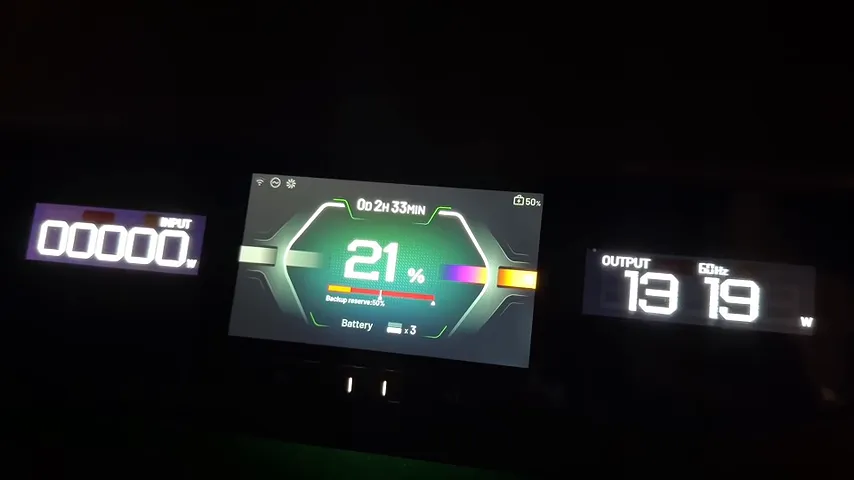
The cooling conditions had changed during the day. We had friends over, and my wife understandably did not want the house sitting at 75°F. The thermostat went back down, and we maintained roughly 70°F for much of the later test.
That made this a more demanding comfort test than the emergency conservation scenario I initially had in mind.
The clock readings place the run from approximately 12:44 p.m. to 9:53 p.m. With the remaining-runtime estimate, my practical takeaway was roughly 11 hours of potential operation under those changing loads. It was not a verified full-discharge result, and the estimate continued changing as appliances cycled.
I restored grid power for the night because I did not want the battery reaching its limit while we were asleep and still relying on the AC.
My Take on the Delta Pro Ultra X for Whole Home Backup
I came away impressed. This 18 kWh configuration supplied the house through the afternoon and evening while keeping refrigeration running and maintaining real air conditioning, much of it around our normal 70°F setting.
My early hope of more than a day of backup was not demonstrated with those comfort loads. Running only essentials could extend runtime substantially, and I believe a couple of days may be possible in a more conservative scenario. That still needs a separate essentials-only test.
The strongest points for me are the inverter's output capability, modular battery storage, mobility, and useful app controls. My main complaints are the proprietary charging cable and the extra solar connection hardware.
If you are sizing one for your own home, start with the loads you truly need. Efficient cooling, reasonable thermostat settings, and shutting off unnecessary pumps can make a bigger difference to runtime than the inverter's headline wattage suggests.
For comparing the Delta Pro Ultra X and original Delta Pro Ultra, the EcoFlow offers linked below are the ones I shared for researching the systems.


