I love my Tesla Powerwall 3. When the grid goes down, it switches over to battery power automatically, and it works with my solar system. That is exactly what I want from a permanently installed home backup system.
But there is still a practical question: What happens when the outage lasts longer than the battery?
In previous home backup tests, I have gotten around 10 or 11 hours out of some pretty substantial battery systems. That is useful, but it does not get you through several days without another source of energy.
The Anker SOLIX E10 caught my attention because it combines expandable batteries, solar input, and a tri-fuel smart generator that can start automatically when the battery reaches a chosen percentage. I tested a two-battery configuration on my house, including my mini split and a conventional air conditioner, then let it run overnight.
There is a lot to like here. There are also a few limitations worth understanding before you spend the money.
Key Takeaways
- The tested E10 configuration provided approximately 12 kWh of storage through two expandable battery modules.
- The smart generator started automatically at the selected 80% battery threshold without interrupting household power.
- Cooling choices significantly changed household demand and the app's estimated remaining runtime.
- The house ran for about 13 hours, including approximately 15 to 20 minutes of generator assistance.
Table of Contents
- What the Anker SOLIX E10 Actually Is
- Connecting It to the House: Manual Backup or Automatic Transfer
- The App Is Central to Using This System
- Can the Anker SOLIX E10 Run Air Conditioning?
- The Smart Generator Is What Makes This Setup Different
- Solar Adds Another Way to Keep the Batteries Charged
- Anker SOLIX E10 vs. Tesla Powerwall 3: Compare Installed Costs
- The Overnight Result: 13 Hours, With Brief Generator Assistance
- My Take: The Recharge Strategy Is the Biggest Selling Point
What the Anker SOLIX E10 Actually Is
The E10 is a modular whole-home battery backup system, not a portable power station covered in household outlets and USB ports.
My test setup had three main pieces in one stack:
- The inverter at the top: This handles power conversion and system control. It does not add battery storage.
- Two battery modules underneath: Each provides approximately 6 kilowatt-hours of storage.
- About 12 kWh of total battery capacity: This was the configuration used for the home test.
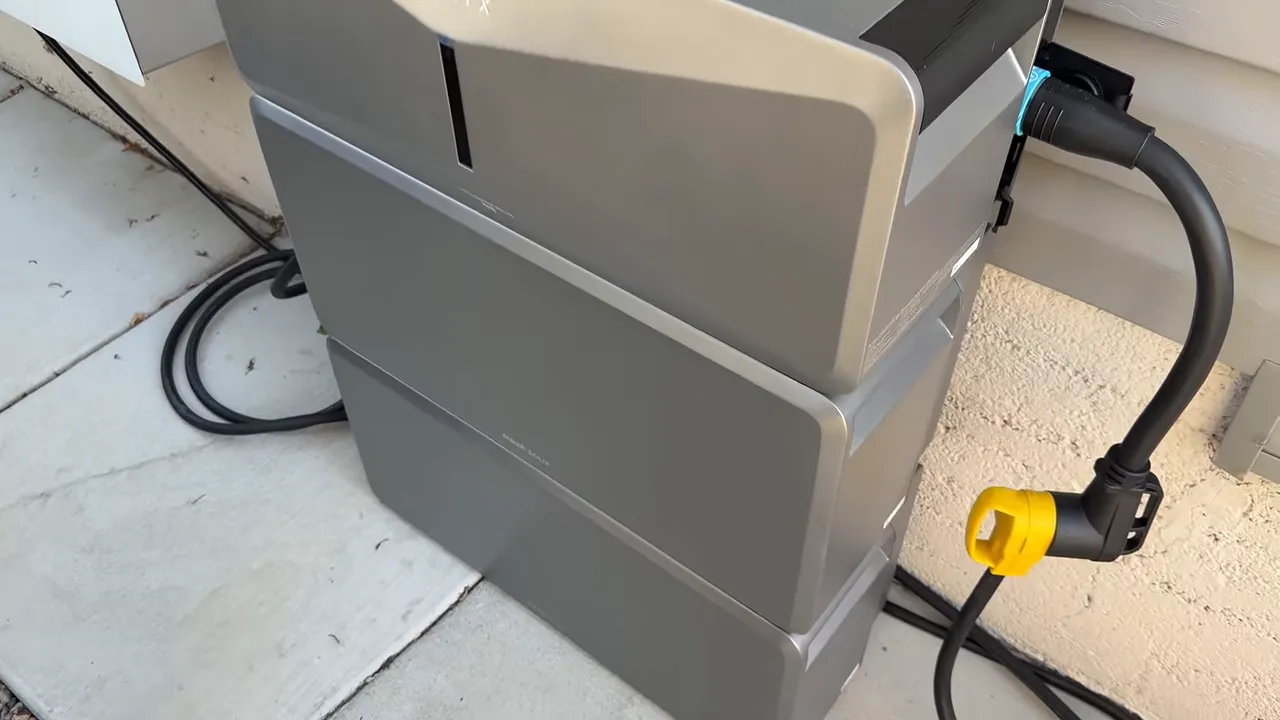
One important distinction: kWh describes stored energy, while kW describes power at a particular moment. Adding batteries increases how much energy you have available. It does not mean every part of the installation can deliver unlimited power.
Anker lists the platform as expandable up to 90 kWh, with 10 kW Turbo output and 155 LRA surge capacity. Those are platform specifications, not capabilities I independently verified at their limits. My testing focused on the smaller stack and the equipment in my own house.
Expandable, but not especially portable
The modular approach is a big deal. You can start with an inverter and one battery, then add storage later instead of paying for your entire eventual setup at once.
But these modules are heavy, and the stack does not have built-in wheels. Anker sells a trolley for moving it, which is how I brought mine into position. You can relocate it if necessary, but this is much closer to a stationary home backup installation than something you casually roll around the yard.
The system includes wall-mounting brackets, and there is also a base option. Those mounting components matter for securing a tall, heavy stack. My temporary demonstration setup was not a completed permanent installation.
Quiet cooling and direct battery connections
One of the first things I noticed was the lack of fan noise. The E10 uses a fanless design with heat-dissipating fins. Standing beside it, I could hear my Tesla system's fans, while the Anker battery stack itself was quiet.
The modules also connect directly as they stack. Rather than running external jumper cables between each battery, the connection is built into the module interface. Securing screws help lock the assembly together.
Anker describes the E10 as designed for outdoor NEMA 4 installation and lists UL 9540 certification and UL 9540A testing. That outdoor design is appealing, especially for equipment that may be needed during storms. Still, outdoor-rated does not mean every adapter, cable, or installation arrangement is automatically suitable for any weather condition. The complete installation needs to follow the manufacturer's requirements.
Connecting It to the House: Manual Backup or Automatic Transfer
There are two different levels of integration here, and it is important not to confuse them.
For this test, I used my existing 30-amp, four-prong power inlet and breaker interlock. The E10 connection used a 50-amp connection adapted to my inlet.
The adapter does not turn a 30-amp inlet into a 50-amp circuit. The inlet, wiring, breaker, cord, and other components still determine the limits of that connection.
My existing inlet required a manual changeover
The interlock physically prevents the utility main breaker and the backup inlet breaker from being switched on together. That separation is critical because backup power must not feed back onto the utility grid.
To simulate an outage, I isolated the house from utility power using the installed interlock arrangement, then enabled the backup supply. After turning on AC output in the Anker app, I heard equipment inside the house come back to life.
This was a manual backup test, not a demonstration of automatic transfer. An inlet and interlock can provide a simpler connection option, but somebody has to perform the changeover.
Have a qualified electrician verify equipment compatibility, grounding and neutral requirements, permits, and local code compliance. Never connect a battery system or generator to house wiring through an ordinary wall receptacle.
The optional Power Dock provides a more integrated route
Anker also offers its SOLIX Power Dock for a more permanent, automatic backup arrangement. The unit I showed had four connection positions for battery system stacks.
The appeal is automatic changeover when utility power fails, similar in day-to-day convenience to what I appreciate about my Powerwall. However, I did not install or test the Power Dock's automatic transfer operation during this experiment. That is a separate installation project.
The App Is Central to Using This System
The E10 does not have a conventional front display or a collection of small-device outlets. There is a status light, but the detailed information and controls are in the app.
Once connected, the app detected the battery modules and the attached smart generator. From there, I could:
- Check battery state of charge.
- Enable AC output to the house.
- See current household power demand.
- Check the estimated remaining runtime.
- Set the smart generator's start and stop percentages.
That is convenient when everything is connected, but it is also a trade-off. If you prefer walking up to a battery and reading a built-in screen, this system does not give you that experience.
Can the Anker SOLIX E10 Run Air Conditioning?
That was one of my biggest questions. Lights and refrigerators are important, but heating and cooling can make or break a home backup plan.
My house has an efficient inverter-driven mini split. I also keep a conventional 1.5-ton air conditioner available for demonstrations, so I tried both.
The mini split showed why load management matters
When the house first came onto backup power, the app showed roughly 820 watts. The lights were on, the mini split had restored its settings, and other household equipment was operating.
The pool pump was running too. I switched that off because it was an unnecessary load for this test.
As the mini split's compressor ramped up, total household demand climbed to around 2.1 to 2.2 kW. At one point, the app estimated about 5 hours and 33 minutes of runtime.
I then turned off an indoor unit we did not need and raised the remaining cooling setpoint from 69°F to about 71°F. Demand dropped, and the estimated runtime increased to around 7 hours and 41 minutes.
Later, with the inverter system maintaining temperature, total demand settled near 1.1 to 1.15 kW. The runtime estimate increased to roughly 10 hours and 24 minutes to 10 hours and 40 minutes.
Those numbers were changing estimates, not separate completed runtime tests. They moved as the compressor ramped up or down and household loads changed.
The day's high was only around 84°F. During hotter weather, the air conditioner would likely work harder and consume more energy. In an outage, raising the cooling setpoint or lowering the heating setpoint can help stretch the battery.
The conventional air conditioner started successfully
I also called for cooling from the conventional 1.5-ton system. It started and ran without a problem during the test.
Total household demand was about 2.5 to 2.59 kW, with an estimated runtime of approximately 4 hours and 53 minutes.
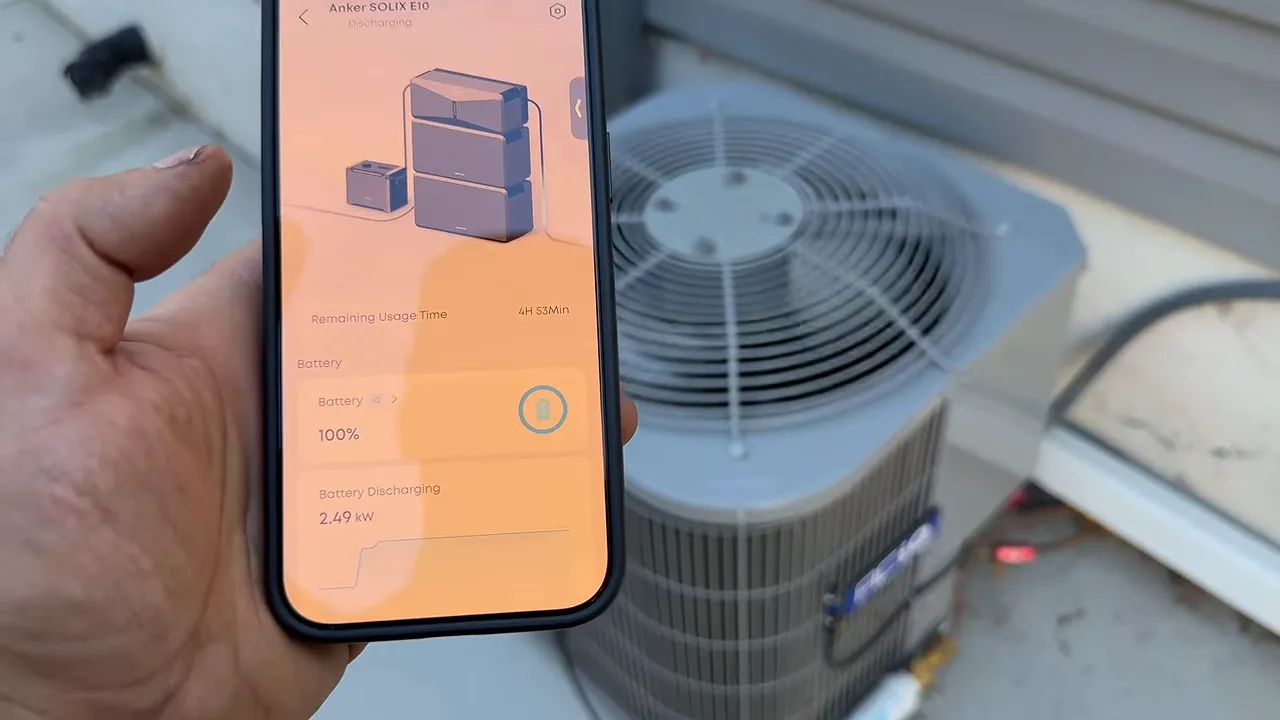
That is a useful result, but it is not a promise that the E10 will start every air conditioner. Compressor starting requirements vary, and your connection method has limits too.
For my house, the contrast reinforced why I normally use the inverter system. It can modulate down while maintaining temperature, and I can control individual rooms instead of cooling spaces that do not need it.
The Smart Generator Is What Makes This Setup Different
A bigger battery gives you more time. A way to recharge it during an extended outage addresses a different problem entirely.
Anker's 5,500-watt-class smart generator integrates with the E10 and supports three fuels:
- Gasoline.
- Liquid propane.
- Natural gas.
Output is lower on propane or natural gas than on gasoline, so the fuel choice matters. Running on gaseous fuel also avoids introducing gasoline into the carburetor.
What I really like is the division of work: the battery system supplies the house while the generator replenishes the battery. The battery and inverter can handle changing household demand within their limits, while the generator contributes charging power.
That does not make generator size irrelevant. Its available output still determines whether charging can keep up with average consumption and how quickly the battery recovers.
Automatic starting worked right at the setpoint
At 7:02 p.m., the battery was at 83%. For demonstration purposes, I set the generator to start at 80% and stop charging at 95%, which was the highest stop setting shown in the app.
The setup required more than moving the percentage control. I also had to enable the automatic-start option and save the settings.
Sure enough, the generator started when the battery reached 80% on the dot.
The app showed generator power increasing through approximately 2.9, 3.3, and 3.7 kW, eventually reaching about 4.02 kW before I changed operating modes.
Meanwhile, the house kept running. I did not notice an interruption when the generator started.
Charging speed depends on the operating mode and house load
I switched the generator into quiet mode. During one reading, it was contributing about 2.04 kW while the house was drawing roughly 750 watts. That left power available to recharge the batteries while still serving the house.
After roughly 10 minutes, the displayed battery level had risen from 80% to 82%. The app subsequently showed about 58 minutes remaining, suggesting roughly an hour-scale recharge to the selected 95% target under those conditions.
I did not complete a timed 80% to 95% charging test. I changed the settings after confirming that the automatic start worked. The charging time was an app estimate, not a measured finished result.
It is convenient, but it is not silent
My informal sound readings were approximately:
- Quiet mode: 72 decibels.
- Eco mode: 78 decibels.
- Turbo mode: 80 decibels.
Those were smartwatch readings in my yard, not standardized laboratory measurements. Nearby fencing also reflected the sound.
Quiet mode was noticeably more comfortable, but this is still a combustion generator. The fanless battery stack and the running generator are two very different noise experiences.
Natural gas can extend operation, but not without limits
We have had outages here in Salt Lake where electricity was unavailable but natural gas service remained active. In that situation, a properly connected natural gas generator could keep replenishing the battery far beyond its standalone runtime.
I would not call that guaranteed unlimited power. Continued operation depends on fuel availability, maintenance, operating limits, and whether charging output can keep up with household demand.
Generator placement is a safety issue, not just a noise issue. Follow the manufacturer's clearance and weather requirements. Never run a fuel-burning generator indoors or put it in a homemade insulated enclosure that could trap exhaust or heat. The CPSC's portable generator safety guidance explains the carbon monoxide hazard and recommends outdoor placement at least 20 feet from the home, with exhaust directed away from buildings.
The generator is useful on its own too
Unlike the stationary battery stack, the generator has wheels and a pull-out handle. I found it easy to roll around.
It also has covered outlets for standalone use, including applications such as camping or powering compatible RV equipment. That gives it utility beyond its role in the home battery setup.
Solar Adds Another Way to Keep the Batteries Charged
The E10 has two PV inputs rated to accept up to 4,500 watts each, for 9,000 watts of total solar input.
That gives the system three complementary energy sources:
- Batteries: Quiet stored energy for the house.
- Solar: Daytime energy to support loads and recharge storage.
- The smart generator: Fuel-powered charging when the battery reaches its chosen threshold.
The flexibility of that combination is the real attraction. You can add battery storage and compatible solar capacity in stages rather than buying everything at once.
The generator settings also let you choose your priorities. A lower start percentage could allow the batteries to carry the house overnight and let solar resume charging in the morning without the generator starting. A higher threshold keeps more battery reserve available but may cause the generator to run sooner.
I discussed the solar capability, but I did not measure solar charging performance during this overnight test.
Anker SOLIX E10 vs. Tesla Powerwall 3: Compare Installed Costs
Based on the pricing figures supplied for the configurations I discussed, the comparison was approximately:
- Anker SOLIX E10: $867 per kWh of storage.
- Tesla Powerwall 3: $1,100 per kWh of storage.
That puts the Anker figure about 22% lower. It is an interesting starting point, but not a universal installed-price comparison. Equipment packages, installation scope, accessories, and current pricing all matter.
My own solar and Powerwall project cost around $30,000 before the tax benefit I received, or about $20,000 afterward. That included both the battery system and solar panels. It was not the price of the Powerwall alone.
For my existing manual inlet arrangement, the components had cost less than $100, including the interlock and wire. That was specific to my installation and did not represent a typical electrician-installed project price.
The practical advantage of the E10 is that you have options. You may be able to use a compatible existing inlet, or you can invest in a professionally integrated automatic setup. You can also spread battery purchases over time.
For a fair comparison, price the complete system you actually want, including transfer equipment, electrical work, mounting, any generator or solar additions, and required permits.
The Overnight Result: 13 Hours, With Brief Generator Assistance
I started the home test at approximately 5:30 p.m. and ran until about 6:30 the next morning.
Total runtime was about 13 hours.
The generator ran for only about 15 to 20 minutes while I verified its operation. I did not leave it automatically maintaining the battery overnight, so this was not a multi-day endurance test.
It also was not a pure battery-only runtime result, because that brief generator session added energy.
Unexpected storms came through overnight, and the system continued operating successfully during the test. By morning, however, the battery had discharged completely.
A full discharge also took the app connection offline
Once the system was fully depleted, I could no longer connect to it in the app. I had to restore charging power before I could reconnect.
That is worth knowing ahead of time. Do not assume that a fully discharged E10 will remain available in the app to show its status. For emergency use, I would plan the charging strategy before reaching that point.
My Take: The Recharge Strategy Is the Biggest Selling Point
I still like my Powerwall 3. Automatic backup and an integrated solar installation are genuinely useful.
But the Anker SOLIX E10 offers a combination I find really compelling: expandable storage, quiet battery operation, substantial solar input, and a smart generator that started exactly at the percentage I selected.
It ran my inverter-driven cooling system, successfully started my conventional 1.5-ton air conditioner, and carried the house through a 13-hour test with only brief generator assistance.
The trade-offs are clear too. The stack is heavy, detailed monitoring depends on the app, the generator makes noise, and automatic home transfer requires the appropriate integration equipment.
For an extended outage, the question is not just how much energy you can store. It is how you will replace the energy you use. That is where this Anker setup stands out to me. You can find the current configurations and equipment details on the Anker SOLIX E10 product page.
If a whole-home battery system is outside your budget and winter heat is the main concern, a properly installed generator transfer solution for a compatible gas furnace may be a more focused starting point. You do not necessarily need to back up the entire house to address your most important outage need.


